Construction software has often grown one workflow at a time. A team builds inspections, then punch lists, then daily reports, then RFIs. Each new tool introduces another schema, status model, permissions pattern, attachment system, reporting method, and integration requirement. The individual tools may work, but the solution becomes a collection of neighboring applications rather than a connected operating system.
Blade AI Forms takes the opposite approach: build one common solution for structured construction records and expose it through domain-specific tools. The solution currently defines 23 construction Form Categories, including inspections, incidents, JHAs, permits, safety talks, daily logs, quality assurance, observations, issues, punch lists, commissioning, deliveries, RFIs, submittals, transmittals, meetings, correspondence, change orders, payment applications, timecards, vendor prequalification, closeout, and warranties.
These categories are not separate databases pretending to be a suite. They are controlled values within one governed architecture. Adding a category means adding a deliberate solution classification and starter experience, not creating another isolated table and duplicating the infrastructure around it.
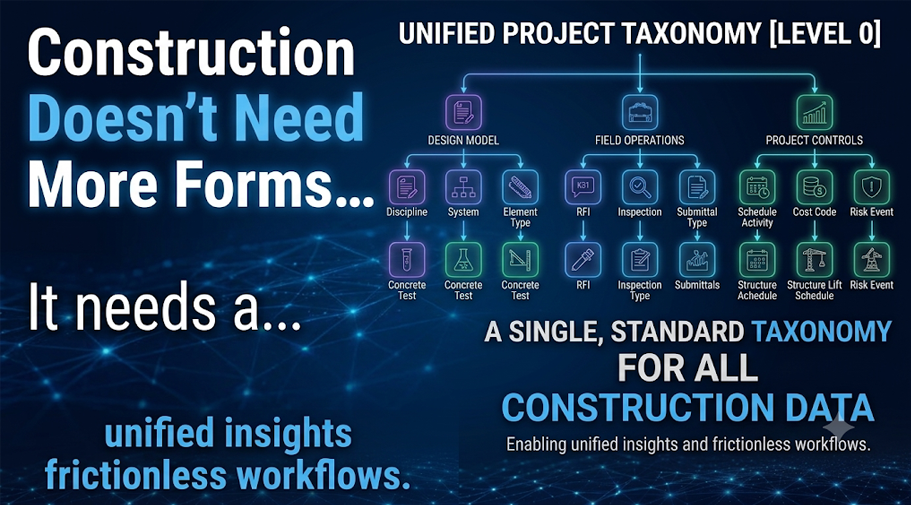
At the same time, category does not eliminate project vocabulary. Within a category, each project can maintain optional Form Types. Under Issues, one project might define Clash Detection, Design Discrepancy, Constructability Issue, Schedule Delay, and Unforeseen Site Condition. Another project may use a completely different list. The solution controls the broad category; the project controls the practical classification it needs for organizing its work.
This two-level taxonomy resolves a familiar product tension. Solutions need stable language for APIs, reporting, permissions, integrations, and analytics. Projects need flexibility because owners, contractors, programs, and regions use different terms. A closed category structure combined with open project-level types provides both governance and adaptability.
It also supports better onboarding and benchmarking. A company can establish recommended templates and terminology without preventing a project from adapting to contract requirements or local practice. New users learn a recognizable solution structure, while experienced teams retain the ability to organize specific work in the language they already use. Over time, the organization can compare results at the category level even when individual projects use different types beneath it.
The same principle applies to the user experience. A payment application should not look or behave like a toolbox talk. A submittal is not a daily report. Each category tool can present its own navigation, terminology, business rules, lists, filters, and actions. Underneath, each tool uses the same capabilities for templates, submissions, relationships, provenance, versioning, anchoring, and workflow.
That shared foundation creates practical advantages. Security and tenancy rules are applied consistently. A standard relationship mechanism can link an inspection to an observation or an RFI to a change event. Common promoted fields can support project-wide lists and reporting without forcing the database to interpret every variable response. Integrations can work with one solution contract instead of learning a different record model for every module.
The architecture also creates a cleaner path for connected analytics. Leadership can ask how many records are waiting for review, which locations have recurring quality failures, how long corrective actions remain open, or which categories create the greatest downstream workload. Because the categories share governance and relationship patterns, those questions do not require a completely separate reporting project for every module.
It also makes new workflows faster to deliver. A category team can focus on construction meaning and experience rather than rebuilding basic form controls, storage, validation, version allocation, attachment behavior, and audit history. The common solution renders fields through the same Blade design system, producing a consistent experience even when the business process differs.
For users, that consistency reduces friction. Text fields, selections, dates, signatures, evidence uploads, errors, and approvals behave in familiar ways across tools. For administrators, authoring and managing templates becomes a shared skill. For project leadership, information can be governed and analyzed across categories. For development teams, architectural boundaries reduce lateral coupling and keep one category from becoming dependent on another.
The strategic result is a solution that can grow without multiplying silos. A failed QA inspection can create an observation. The observation can lead to an RFI. The RFI response can affect a change order. The change can influence a payment application and eventually become part of closeout evidence. Those records retain their distinct purposes while remaining connected through a common foundation.
Construction workflows are specialized on the surface but deeply related underneath. Blade AI Forms respects both truths: tool-based where people work, form-based where the solution governs and connects the data.